IDrive® e2 MCP

IDrive® e2 MCP connects your IDrive® e2 object storage with AI assistants and applications using the open Model Context Protocol (MCP) standard. It enables compatible AI clients to securely access and work with your data using natural language, eliminating the need for custom integrations, scripts, or manual workflows.
IDrive® e2 offers a hosted and a self-hosted MCP. You can choose a deployment model that fits your environment.
IDrive® MCP securely connects your IDrive® storage with MCP-compatible AI clients, giving you the flexibility to choose between a hosted or self-hosted deployment. With the Hosted MCP option, you can connect without managing infrastructure using the hosted MCP Endpoint: https://mcp.idrivee2.com/s3. Alternatively, with Self-Hosted MCP, you can deploy the MCP server in your own environment and connect using the self-hosted MCP default Endpoint: http://127.0.0.1:1908/s3.
After authorization, your AI client can perform actions on your IDrive® e2 buckets and objects based on your requests, such as searching, reading, and managing data.
Note: The Self-hosted MCP supports only username and password authentication.
Yes. IDrive® e2 MCP is an OAuth-protected Model Context Protocol (MCP) server that enables AI applications to securely interact with your IDrive® e2 account without exposing your access keys. Compatible AI clients authenticate using short-lived, scoped OAuth tokens, while your IDrive® e2 credentials remain securely encrypted on the server.
You control the permissions granted to each application and can revoke access at any time.
No. IDrive® e2 MCP performs only the actions you explicitly request through your connected AI application. Any read, write, or management operations require your authorization and are subject to the permissions you've granted.
Note: Delete operations are permanent. Any object or bucket deleted through the MCP server is permanently removed and cannot be recovered. Exercise caution before performing delete operations.
Yes. You can revoke access for any connected AI application at any time from your IDrive® e2 account.
To revoke access,
- Sign in to IDrive® e2 account.
- Go to Settings > Connected Applications.
- Click Revoke access for the application that you wish to disconnect from your IDrive® e2 account.
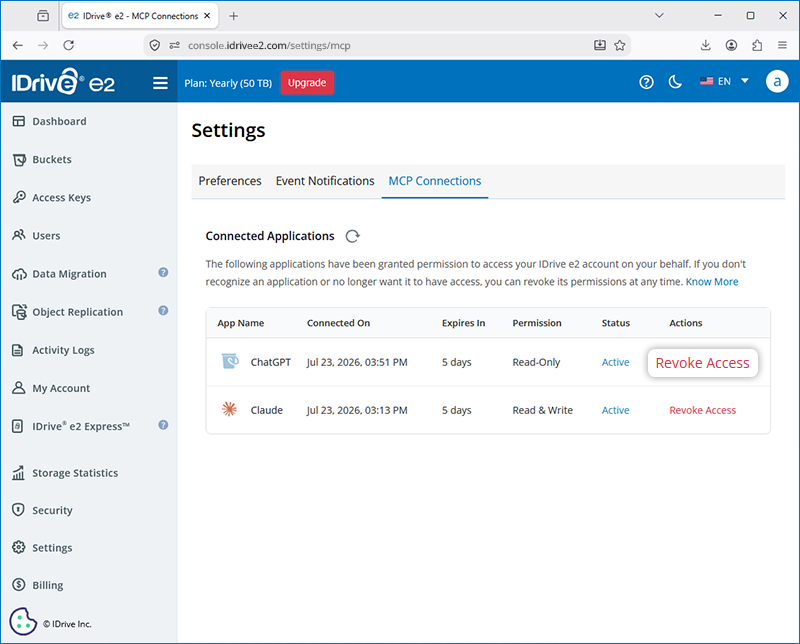
- Click Revoke access in the popup to confirm.
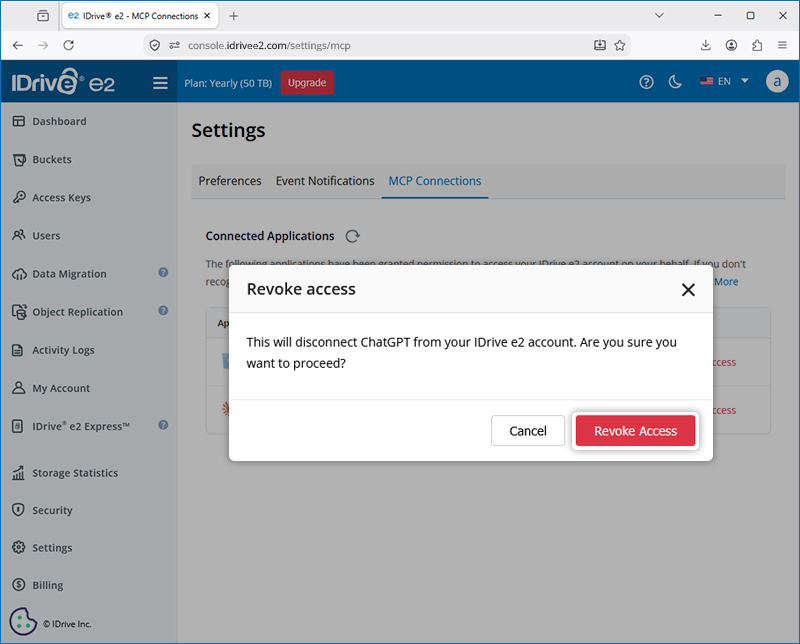
Once access is revoked, the application will no longer be able to access your storage unless you authorize it again.
Important Notes:
- Revoking an MCP authorization may interrupt active operations. If an MCP connection is revoked from an AI client or the IDrive® e2 web interface while requests are in progress, those operations may be interrupted or fail.
- Revoking an MCP connection from an AI client does not synchronize with the IDrive® e2 web console. As a result, the connection may continue to appear as Active in the web interface even though it has been revoked from the AI client. To fully revoke the connection, you must also revoke it manually from the IDrive® e2 web interface.
No. IDrive® e2 MCP lets you interact with your IDrive® e2 storage using natural language through compatible AI applications. This eliminates the need for custom integrations, scripts, or manual workflows for many common tasks.
With IDrive® e2 MCP, you can use natural language to interact with your object storage. Depending on your AI application and the permissions you've granted, you can:
- Create, list, and manage buckets.
- Search, and organize objects.
- Retrieve object metadata and bucket information.
- Generate pre-signed URLs to securely share objects.
- Enable and manage Object Lock for supported buckets.
- Analyze and summarize files stored in your account.
- Automate repetitive storage management tasks.
- Build AI-powered workflows that integrate with your IDrive® e2 storage.
Yes, if the AI agent supports connecting to MCP servers through local endpoints. For AI agents that require a publicly accessible MCP endpoint, configure your self-hosted MCP server with a public HTTPS URL using the --public-url option and expose the server through a reverse proxy.
IDrive® e2 MCP supports the following read-only and read-write tools:
| Read-only (28 tools) | ||
|---|---|---|
| list_buckets | head_bucket | get_bucket_location |
| list_regions | list_objects | list_objects_v2 |
| list_object_versions | head_object | get_object_attributes |
| list_multipart_uploads | list_parts | get_object_tagging |
| get_object_legal_hold | get_object_retention | get_object_lock_configuration |
| get_bucket_cors | get_bucket_encryption | get_bucket_lifecycle_configuration |
| get_bucket_logging | get_bucket_notification_configuration | get_bucket_policy |
| get_bucket_replication | get_bucket_tagging | get_bucket_versioning |
| get_bucket_website | get_bucket_inventory_configuration | list_bucket_inventory_configurations |
| presign_get_object | ||
| Read-write (37 tools) | ||
|---|---|---|
| create_bucket | delete_bucket | copy_object |
| delete_object | delete_objects | restore_object |
| create_multipart_upload | upload_part_copy | complete_multipart_upload |
| abort_multipart_upload | presign_put_object | presign_delete_object |
| presign_upload_part | put_object_tagging | delete_object_tagging |
| put_object_legal_hold | put_object_retention | put_object_lock_configuration |
| put_bucket_cors | delete_bucket_cors | put_bucket_encryption |
| delete_bucket_encryption | put_bucket_lifecycle_configuration | delete_bucket_lifecycle |
| put_bucket_logging | put_bucket_notification_configuration | put_bucket_policy |
| delete_bucket_policy | put_bucket_replication | delete_bucket_replication |
| put_bucket_tagging | delete_bucket_tagging | put_bucket_versioning |
| put_bucket_website | delete_bucket_website | put_bucket_inventory_configuration |
| delete_bucket_inventory_configuration | ||